
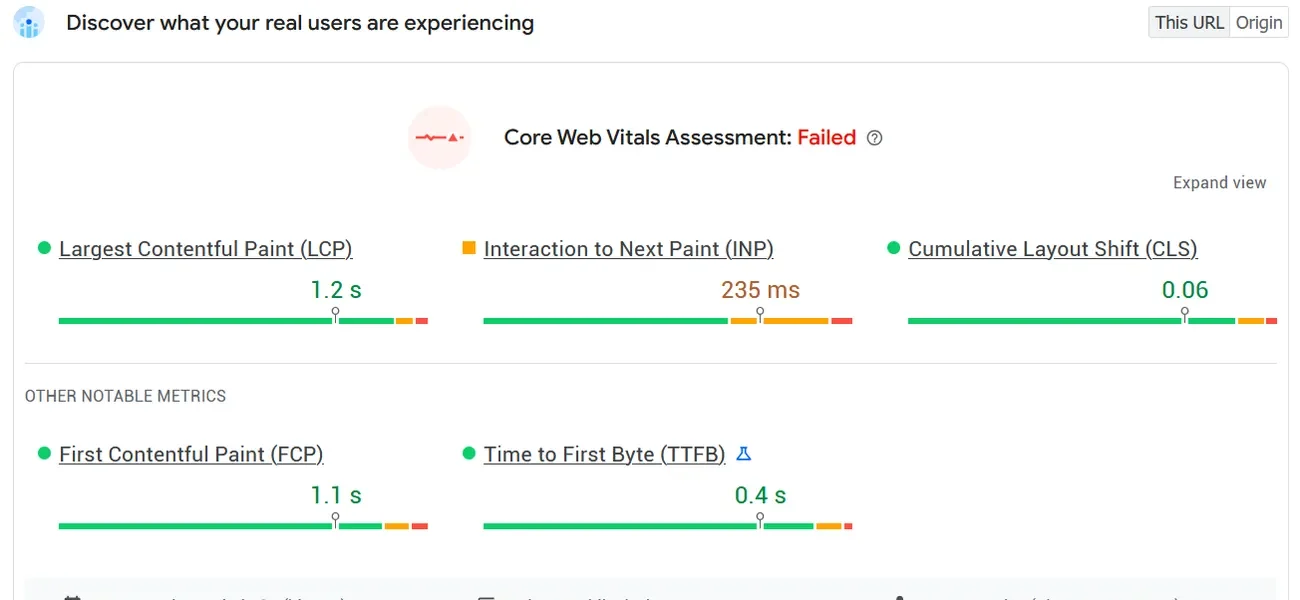
Three numbers decide whether Google considers your WordPress site fast enough: LCP under 2.5 seconds, INP under 200 milliseconds, CLS under 0.1. If any of those fail on 75% of your page loads, you’ve got a Core Web Vitals problem. Here’s how to find which metric is broken and fix it with specific WordPress techniques.
What are Core Web Vitals?
Core Web Vitals are three performance metrics Google uses as ranking signals. As of 2026, the metrics are:
- LCP (Largest Contentful Paint) — how fast the main content loads. Threshold: under 2.5 seconds.
- INP (Interaction to Next Paint) — how responsive the page is when users click or tap. Threshold: under 200ms. INP replaced FID in March 2024.
- CLS (Cumulative Layout Shift) — how much the page layout jumps around during load. Threshold: under 0.1.
Every 100ms improvement in LCP can boost ecommerce conversions by up to 8%. These aren’t vanity metrics. They directly affect revenue and rankings.
How to diagnose which metric is failing
Start with Google Search Console. Open the Core Web Vitals report under Experience. It shows field data grouped by URL pattern and tells you exactly which metric is failing on mobile vs desktop.
For deeper analysis, use these tools:
- Chrome DevTools Performance tab — record a page load, look for long tasks blocking INP and the LCP element highlighted in the timeline.
- WebPageTest.org — run tests from multiple locations with throttled connections. The filmstrip view shows exactly when LCP fires.
- Query Monitor plugin — identifies slow database queries and hooks eating up TTFB on the server side.
- PageSpeed Insights — gives both field data (real users) and lab data (synthetic). Focus on field data for ranking impact.
Fix in this priority order: TTFB first, then LCP, then INP, then CLS. A slow server (high TTFB) makes every other metric worse. No amount of frontend optimization compensates for a 1.5-second server response.
How to fix LCP on WordPress
LCP is almost always an image or a large text block. On WordPress, it’s usually the hero image or the featured image on posts. The fix depends on what’s causing the delay.
Preload the LCP image
WordPress won’t discover your hero image until it parses the CSS or HTML that references it. Add a preload hint so the browser fetches it immediately:
<link rel="preload" as="image" href="/wp-content/uploads/hero.webp" fetchpriority="high">In your theme’s functions.php or a custom plugin, hook into wp_head with priority 1 to output this before anything else.
Fix server response time (TTFB)
If TTFB exceeds 600ms, your LCP will almost certainly fail. Common WordPress causes:
- Shared hosting with oversold servers. Move to a managed WordPress host or a VPS with LiteSpeed/OpenLiteSpeed.
- No object caching. Install Redis and configure
wp-config.php:
define('wp_REDIS_HOST', '127.0.0.1');
define('wp_REDIS_PORT', 6379);
define('wp_REDIS_DATABASE', 0);- Running PHP 7.x. Upgrade to PHP 8.2+ for a 15-25% speed improvement on WordPress core alone.
- WooCommerce cart fragments loading on every page. Disable them on non-cart pages:
add_action('wp_enqueue_scripts', function() {
    if (!is_cart() && !is_checkout()) {
        wp_dequeue_script('wc-cart-fragments');
    }
});
Serve images in modern formats at correct sizes
Convert images to WebP or AVIF. Use srcset and sizes attributes so browsers download the right resolution. WordPress 6.x generates responsive images automatically, but many themes override this behavior. Check your rendered HTML to confirm srcset is present on the LCP image.
How to fix INP on WordPress
INP measures how long the browser takes to respond after a user interaction. Between 23% and 43% of WordPress sites still fail INP in 2025 field data. The culprit is almost always JavaScript blocking the main thread.
Defer non-critical JavaScript
Add defer or async to scripts that don’t need to run before first paint. In WordPress, filter the script tag:
add_filter('script_loader_tag', function($tag, $handle) {
    $defer_scripts = ['contact-form-7', 'comment-reply', 'wp-embed'];
    if (in_array($handle, $defer_scripts)) {
        return str_replace(' src', ' defer src', $tag);
    }
    return $tag;
}, 10, 2);
Delay third-party scripts
Analytics, chat widgets, and ad scripts don’t need to load until the user interacts with the page. Delay them until first user interaction (scroll, click, or touch):
document.addEventListener('scroll', function loadDelayed() {
    // Load analytics, chat widget, etc.
    document.removeEventListener('scroll', loadDelayed);
}, { once: true });
Break up long tasks
Any JavaScript task over 50ms is a “long task” that blocks interaction. Page builders like Elementor and Divi often produce 200-400ms tasks on load. If you can’t remove the page builder, use requestIdleCallback or scheduler.yield() to break work into smaller chunks. Or better: move to a lightweight block theme and eliminate the problem entirely.
How to fix CLS on WordPress
Layout shifts happen when elements change size or position after the page starts rendering. Three common causes on WordPress:
Images without dimensions
Every <img> tag needs explicit width and height attributes. WordPress 5.5+ adds these automatically for images in content, but theme template images (logos, hero backgrounds) often lack them. Check your above-the-fold HTML. If an image is missing dimensions, the browser can’t reserve space for it.
Web fonts causing FOUT
When custom fonts load late, text reflows from the fallback font to the custom font. Fix with font-display: swap in your @font-face declarations, and preload your critical fonts:
<link rel="preload" as="font" type="font/woff2"
      href="/wp-content/themes/your-theme/fonts/main.woff2" crossorigin>
Dynamic embeds and ads
Ads, YouTube embeds, and social widgets inject content after page load. Reserve space with a fixed-height container using CSS aspect-ratio or explicit min-height. For ads, use the min-height of the ad slot’s most common creative size.
When caching plugins are not enough
A caching plugin (WP Rocket, LiteSpeed Cache, W3 Total Cache) solves TTFB for logged-out visitors by serving static HTML. But it won’t fix everything.
Caching doesn’t help when:
- Your theme loads 15 CSS files and 20 JS files. The page is fast to generate but slow to render. You need to reduce and concatenate assets.
- Logged-in users bypass cache entirely. WooCommerce stores, membership sites, and LMS platforms serve uncached pages to most of their active users.
- Your hosting can’t handle traffic spikes even with cache misses. Object caching (Redis/Memcached) and a proper CDN handle this layer.
- Third-party scripts dominate your main thread. No server-side cache fixes client-side JavaScript bloat.
If your site is fundamentally over-engineered (page builder with 40 plugins on shared hosting), caching is a bandaid. The architecture needs to change.
Need help diagnosing performance issues on your WordPress site? Our SEO consulting service includes a full Core Web Vitals audit with specific, prioritized fixes for your stack.